
Case study
Immersive Digital Twins: Microsoft Flight Simulator and HoloLens
A Unity and Azure Digital Twins prototype connecting Microsoft Flight Simulator telemetry to HoloLens, exploring live spatial visualization and the limits of first-generation hardware.
Mixed-Reality Prototype · Unity, Azure Digital Twins, and HoloLens
I explored immersive digital twins by connecting a simulated aircraft to a spatial view on HoloLens. While I piloted an F-15 in Microsoft Flight Simulator 2020, its telemetry flowed through Azure Digital Twins into a Unity application, updating the aircraft's position in mixed reality.
- Built: A working connection between a desktop simulation, cloud-hosted twin data, and a headset visualization.
- Explored: How changing aircraft telemetry could be represented in a shared geospatial context.
- Constraint: The first-generation HoloLens had to process incoming updates while rendering terrain.
From Simulation to Spatial Context
The question was how to make a stream of simulation values tangible in mixed reality. Latitude and longitude needed to become a position in a spatial scene, with the headset reflecting changes as the flight continued.
The broader concept considered data arriving from cloud or edge systems. This demonstration used Azure as the connection between Microsoft Flight Simulator and the headset.

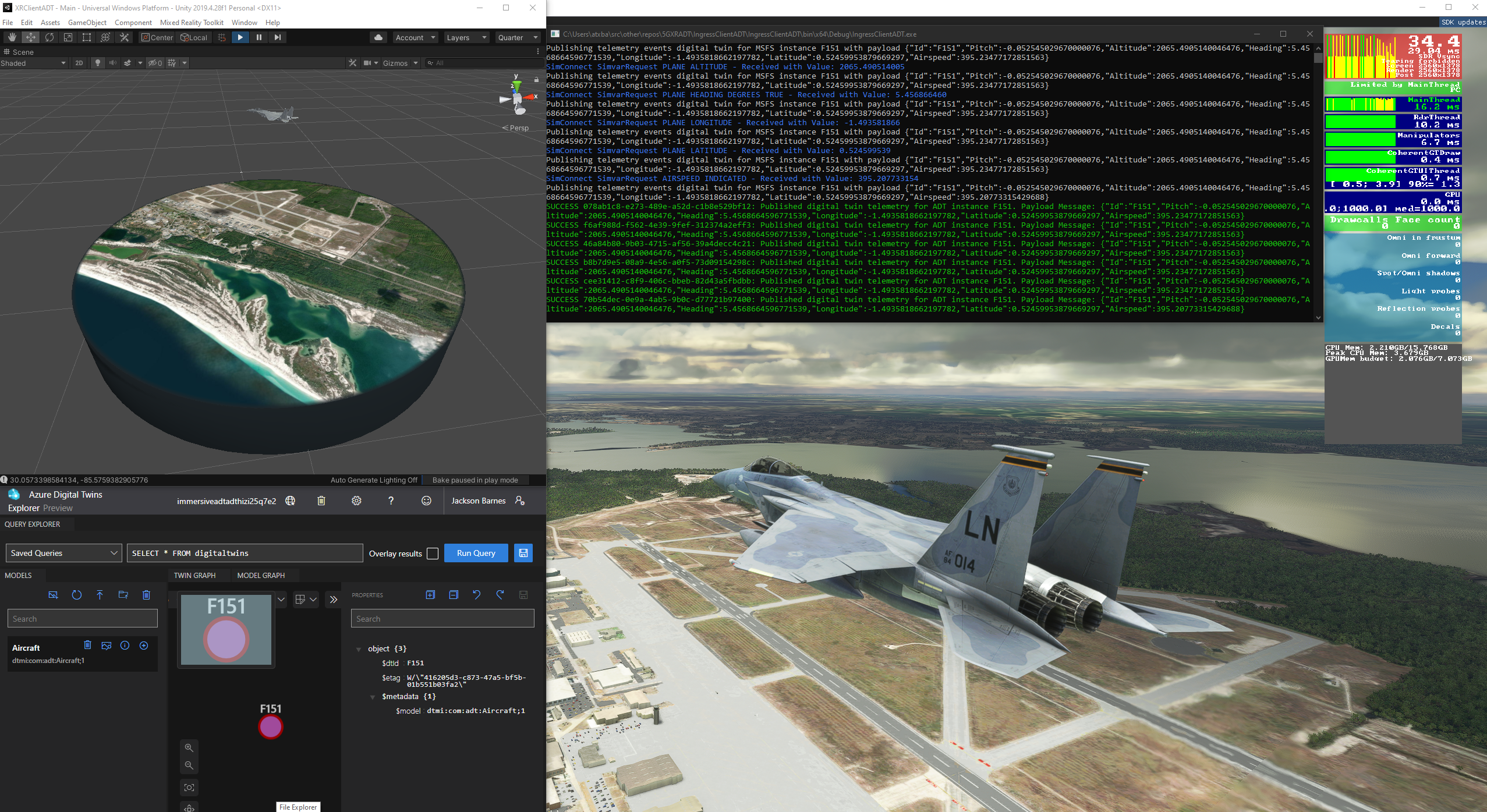
The development setup brings together the simulator, published telemetry, the Azure twin, and the Unity visualization.
How the Prototype Worked
| Component | Role in the Demonstration |
|---|---|
| Microsoft Flight Simulator 2020 | Supplied changing aircraft simulation variables, including latitude and longitude. |
| Azure Digital Twins and DTDL | Represented the aircraft as a digital twin, using Digital Twin Definition Language to describe its data model. |
| SignalR and Unity | Connected incoming telemetry updates to the visualization. |
| First-generation HoloLens | Displayed the aircraft's changing geographic position in mixed reality. |
The implementation combined C#, C++, and JSON with Unity and Azure services. The work centered on getting the same aircraft state from the simulation into the spatial client.

The headset view shows the aircraft's position updating as the simulation runs.
Working Within Headset Limits
The HoloLens 1 struggled with the combined load of geospatial terrain rendering and incoming telemetry processing. That constraint was a meaningful part of the prototype: establishing the data connection did not, by itself, make the spatial experience run smoothly.
Engineering takeaway: Data delivery and rendering need to be considered together when the receiving device is a constrained headset.
What the Prototype Demonstrated
The result was a near-real-time connection from a running simulation to a mixed-reality view. It demonstrated the cloud-backed integration and exposed the hardware limitations that would need further work before a more demanding deployment.

The desktop side of the demonstration: the aircraft I controlled and the telemetry being read from the simulator.