
Case study
3D Sequence Diagram for Mixed Reality
An interactive Three.js prototype for exploring software architecture in 3D, using layered sequence diagrams, camera controls, and a person model for spatial context.
Spatial Interface Prototype · React, TypeScript, and Three.js
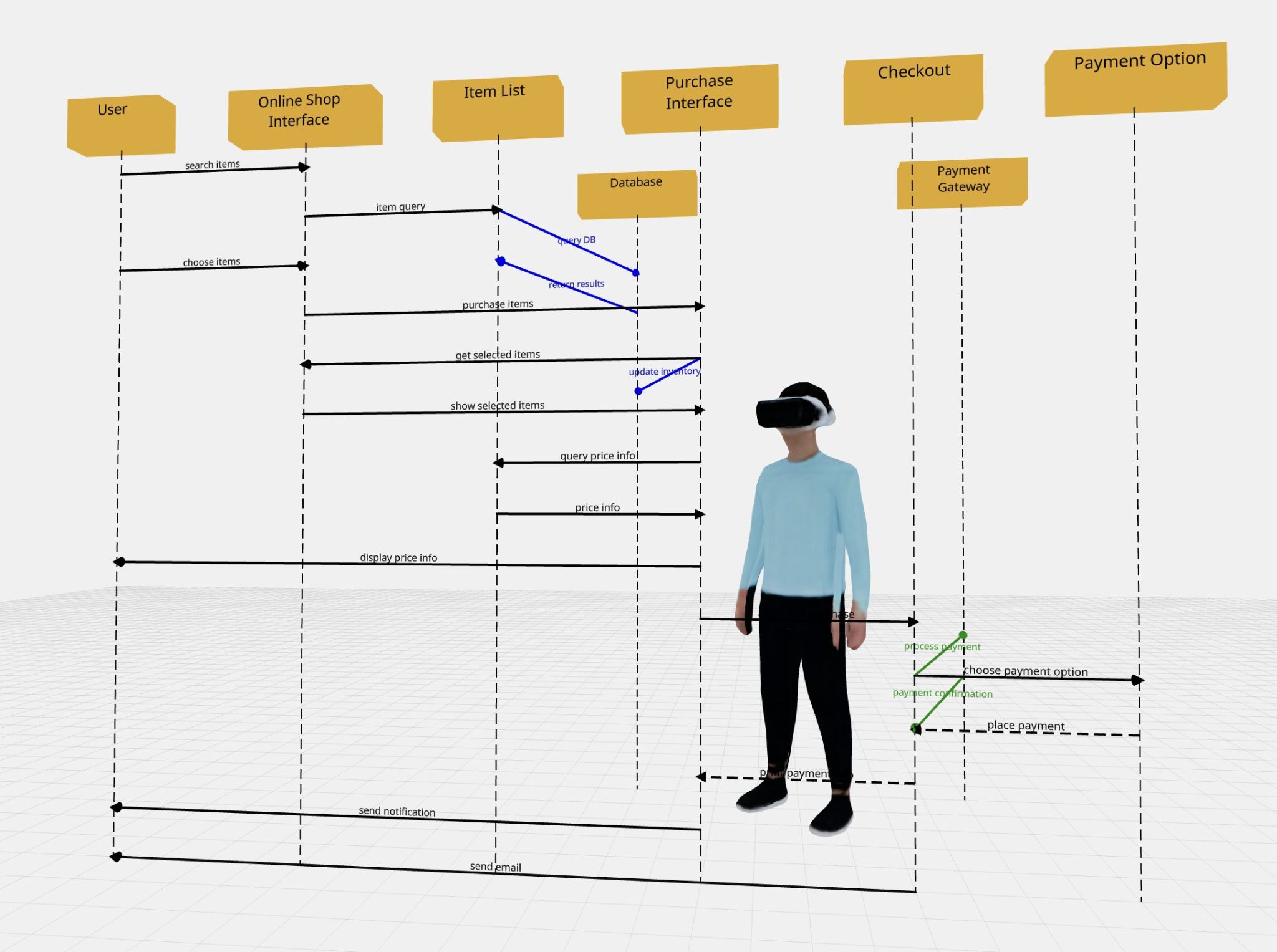
I built an interactive 3D sequence-diagram mockup to explore how software architecture might be navigated spatially. The prototype places familiar diagram elements—actors, messages, and lifelines—into a scene that can be rotated, panned, and zoomed.
- Built: A browser-based 3D diagram with a fixed example of an online shopping flow.
- Interaction: Camera controls reveal relationships between the main flow and backend components positioned at a different depth.
- Exploration: A foundation for a possible mixed-reality interface; query-driven generation and code editing remained future ideas.

The fixed example combines familiar sequence-diagram notation with depth and a person model to suggest a spatial viewing experience.
The Spatial Design Question
A sequence diagram already communicates order and relationships. I wanted to explore what an additional dimension could contribute: separating layers of a system while keeping the connections between them visible.
The longer-term idea was to move through levels of abstraction, ask about a pathway, and eventually inspect the related code. This first version focused on making the spatial representation concrete and interactive.
Building the Prototype
I used React and TypeScript with Three.js, React Three Fiber, and Drei, working with Claude during development and a person model from Luma.ai.
The implementation separates diagram objects from messages. Objects render labeled boxes and dashed lifelines; messages render a connection, an arrowhead, and a label between two positions. The example data is hardcoded, with database and payment-gateway interactions extending behind the main shopping flow.
| Implementation Choice | Purpose |
|---|---|
| Reusable object and message components | Keep the rendering logic separate from the example's positions, labels, and connections. |
| Depth-separated backend objects | Make another system layer visible without removing its relationship to the main flow. |
| Colored connections, dashed lines, and multiline labels | Preserve distinctions and readable labels within the 3D scene. |
| Orbit, pan, and zoom controls | Let viewers inspect the layout from different perspectives. |
Making Depth Understandable
The design tension was preserving the readability of a sequence diagram while introducing perspective. Depth can separate information, but it also changes how labels and connections overlap. The camera controls make that tradeoff inspectable; the grid and person model provide spatial reference.

An angled view exposes the separation between the main sequence and backend interactions.
Delivered Prototype and Future Direction
The delivered artifact is an interactive browser mockup with a fixed diagram. It gives the spatial concept a working form that can be examined and changed in code.
Generative diagrams, pathway queries, repository retrieval, and editing code from within the spatial environment were proposed next steps. The prototype does not implement those capabilities or headset-based navigation. Its value is the concrete interaction study: a way to explore how software relationships could occupy space before building a larger development environment.